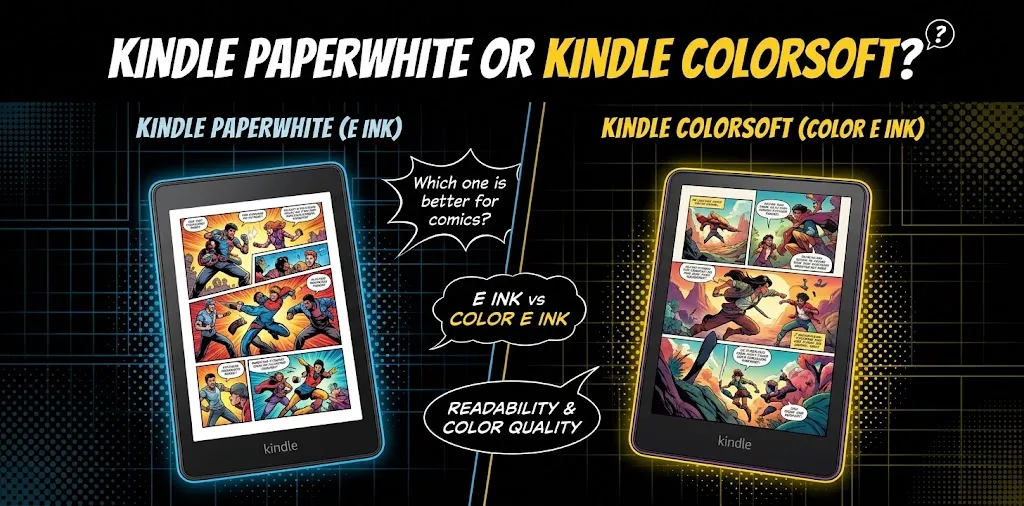
Kindle Paperwhite or Kindle Colorsoft? Which one is better for comics?

If you mainly read color comics and graphic novels, the Kindle Colorsoft is the better choice because it shows comic artwork in color instead of grayscale. Its 7-inch color E Ink display also supports pinch-to-zoom and Comixology Guided View on supported titles. However, the Paperwhite has sharper black-and-white text, and its lower price makes more sense if you mostly read manga or regular books.
For comics, the choice is less about which Kindle is “better” overall and more about what kind of comics you read. A colorful superhero comic, graphic novel, or illustrated book benefits from the Colorsoft. A black-and-white manga or comic with small text may not gain as much from the color screen.
| Kindle Paperwhite | Kindle Colorsoft | |
|---|---|---|
| Screen | 7-inch E Ink, black and white | 7-inch color E Ink |
| Color comics | No, grayscale | Yes |
| Black-and-white comics | Excellent | Very good |
| Color resolution | N/A | Up to 150 ppi for color |
| Black-and-white resolution | 300 ppi | 300 ppi |
| Zoom | Yes | Yes |
| Guided View | Supported on compatible titles | Supported on compatible titles |
| Waterproof | Yes | Yes |
| Battery | Up to 12 weeks | Up to 8 weeks |
| Storage | 16GB | 16GB or 32GB, depending on model |
| Starting price listed by Amazon | $159.99 | $249.99 |
| Best for | Manga, black-and-white comics, books | Color comics and graphic novels |
Amazon’s current US listings put the 16GB Paperwhite at $159.99 and the 16GB Colorsoft at $249.99, although sale prices can be substantially lower.
Color comics look much better on the Kindle Colorsoft
This is the biggest reason to choose the Colorsoft.
The Paperwhite displays comic pages in grayscale. That works well for manga and black-and-white artwork, but it removes one of the biggest parts of a traditional color comic: the color itself.
The Colorsoft uses a 7-inch color E Ink display. Amazon specifically designed it to show comics, graphic novels, illustrations, photographs, and other color content. You can also switch between Standard and Vivid color modes depending on your preference.
For a comic such as a modern superhero graphic novel, the Colorsoft lets you see things such as:
- Character costumes in their intended colors
- Colored backgrounds
- Skin tones
- Lighting effects
- Maps and illustrations
- Color-coded panels and text
That makes the Colorsoft the obvious winner when color is an important part of the artwork.
But don’t expect iPad-like colors
Colorsoft is still an E Ink reader, not an OLED or LCD tablet.
Its colors are softer and less saturated than what you would see on an iPad, phone, or traditional tablet. Reviews have described the display as more paper-like, while noting that the colors do not have the brightness and punch of a conventional screen.
That’s not necessarily a problem. If you specifically want a Kindle because you prefer a reflective, paper-like reading experience, the Colorsoft’s muted color can actually be part of its appeal.
The Paperwhite is still excellent for black-and-white comics
If you mostly read manga, the Paperwhite becomes much more interesting.
Manga is usually black and white, so the Colorsoft’s main advantage does not matter nearly as much. The Paperwhite’s monochrome display gives you crisp black text and line art without the color layer.
The 12th-generation Paperwhite has a 7-inch display and a high-contrast E Ink panel designed for sharp text and images. Amazon rates its battery life at up to 12 weeks.
For something like a black-and-white manga volume, the Paperwhite can therefore be the better value.
You are essentially paying extra for a feature you may barely use if almost everything you read is monochrome.
Small comic text is a bigger issue than color
There’s an important limitation that is easy to miss: both devices have a 7-inch screen.
A full comic page can contain a lot of small speech bubbles and detailed artwork. When an entire page is displayed at once, some text may be uncomfortable to read without zooming.
Reviews of the Colorsoft have specifically noted that some comic text can be too small on a full 7-inch page, while Guided View can help on supported comics.
This means the Colorsoft’s color display does not magically make a 7-inch Kindle ideal for every graphic novel.
If you frequently read comics with:
- Very small speech bubbles
- Dense artwork
- Double-page spreads
- Detailed illustrations
- Large-format graphic novel layouts
you may prefer a larger tablet or large-format color e-reader.
Guided View can make comics easier to read
Supported comics can use Comixology’s Guided View feature. Instead of showing the entire page at once, it can move through individual panels so you can read the dialogue without constantly zooming manually. Amazon specifically lists Guided View as a feature for supported comics on Colorsoft.
That makes the Colorsoft more practical for comics than simply looking at its 7-inch screen size might suggest.
Still, compatibility varies by title, so you shouldn’t assume every comic will provide the same panel-by-panel experience.
The Colorsoft’s color resolution has a trade-off
The Colorsoft isn’t simply a Paperwhite with a color switch.
The black-and-white portion of its display can reach 300 ppi, while color content is displayed at a lower effective resolution. Reviews commonly cite 150 ppi for color images.
For most comic pages, this does not make the artwork unusable. In fact, reviewers have found color comics enjoyable and detailed on the Colorsoft.
But if you put a Colorsoft next to a Paperwhite and look closely at black text, you may prefer the Paperwhite’s sharper monochrome presentation.
So there is a real trade-off:
Paperwhite: better pure black-and-white reading experience.
Colorsoft: more versatile when color matters.
Page turns can feel different when reading comics
Color E Ink has another compromise: refreshing a page with color content can be more noticeable.
Some reviews have reported visible screen flashes or refresh behavior when turning pages or zooming through color illustrations.
You may get used to it quickly, but if you’re sensitive to screen refreshes, this is worth considering before buying.
For ordinary black-and-white reading, the Paperwhite’s experience is simpler and more consistent.
This is one reason the Colorsoft isn’t automatically the better Kindle just because it has color.
Which one is better for different types of comics?
The answer becomes much easier when you match the device to the type of material you read.
| What you read most | Better choice |
|---|---|
| Marvel or DC color comics | Colorsoft |
| Color graphic novels | Colorsoft |
| Children’s illustrated comics | Colorsoft |
| Manga | Paperwhite |
| Black-and-white graphic novels | Paperwhite |
| Comics with lots of color artwork | Colorsoft |
| Mostly regular books with occasional comics | Paperwhite |
| Comics plus regular books | Colorsoft if color matters |
| Large, detailed graphic novels | Consider a larger screen |
If you read Marvel, DC, or other color comics
Choose the Colorsoft.
The ability to see the original colors is a meaningful improvement over grayscale. Costumes, backgrounds, artwork, and visual effects all benefit.
If you mainly read manga
Choose the Paperwhite unless you specifically want color covers and other color content.
For black-and-white manga, the Colorsoft’s main selling point becomes much less important. The Paperwhite also gives you the sharper monochrome experience at a considerably lower starting price.
If you read both comics and novels
This is where the decision gets closer.
If comics are an occasional extra and novels make up most of your reading, the Paperwhite is probably the smarter purchase.
If you regularly switch between novels and colorful comics, the Colorsoft gives you more flexibility.
Price matters more than it first appears
Amazon currently lists the 16GB Paperwhite at $159.99 and the 16GB Colorsoft at $249.99 in the US. That’s a $90 difference at the listed prices.
The Colorsoft Signature Edition is listed at $279.99 and adds 32GB of storage, wireless charging, and an auto-adjusting front light.
For a comic reader, the extra storage can be useful because graphic novels and comic collections can take more space than ordinary text-heavy ebooks.
But don’t automatically assume you need 32GB. If you regularly remove finished comics from your device or use your Kindle library/cloud storage, 16GB may be enough for your reading habits.
Which Kindle should you buy for comics?
Buy the Kindle Colorsoft if color comics are a major reason you’re buying a Kindle. It is the better fit for superhero comics, colorful graphic novels, illustrated books, and other artwork where color changes the reading experience.
Buy the Kindle Paperwhite if you mostly read manga or black-and-white comics. You get a sharp 7-inch monochrome display, long battery life, waterproofing, and a much lower starting price.
There’s also a third option worth considering: if comics are your main reason for buying a device and you want a large page with vivid colors, a tablet can make more sense than either Kindle. A 7-inch E Ink reader is portable and comfortable outdoors, but it cannot provide the same large, saturated display as a tablet. Reviews of the Colorsoft have also pointed out that the 7-inch size can feel limiting for full graphic-novel pages.
Is Kindle Colorsoft worth it for comics?
The Colorsoft is worth considering if you regularly read color comics and graphic novels and want the distraction-free, paper-like experience of an E Ink Kindle.
Its biggest advantage is obvious: you finally get color artwork on a Kindle. Its biggest weaknesses are the 7-inch screen, softer color presentation compared with a tablet, occasional visible refresh behavior, and higher price.
For someone who reads color comics several times a week, those trade-offs are easier to justify.
Is Kindle Paperwhite good for comics?
Yes. The Paperwhite is very good for manga and black-and-white comics, but it is less suitable for comics where color is essential to the artwork.
Its 7-inch display is large enough for comfortable reading in many cases, but full-page comic text can still require zooming. The lack of color is the main limitation rather than the screen’s general reading quality.
Does Kindle Colorsoft show comics in color?
Yes. Compatible comics and graphic novels can display their artwork in color on the Colorsoft. Amazon also supports Comixology Guided View on supported titles, allowing readers to move through individual panels instead of always viewing the entire comic page.
Can Kindle Paperwhite read color comics?
Yes, but the Paperwhite displays them in grayscale. The comic itself can still be read, but colors, shading, and other visual elements that depend on color will not appear as intended.
Final verdict
For color comics, the Kindle Colorsoft wins. It gives you something the Paperwhite simply cannot: comic artwork in color while keeping the paper-like E Ink reading experience.
For manga and black-and-white comics, the Kindle Paperwhite is the better value. Its sharper monochrome display and lower price make more sense when color isn’t important.
One practical tip: before buying either Kindle specifically for comics, check a few of the exact titles you plan to read for Kindle/Comixology availability and Guided View support. The device can only be as good as the comic format you’re actually able to read on it.