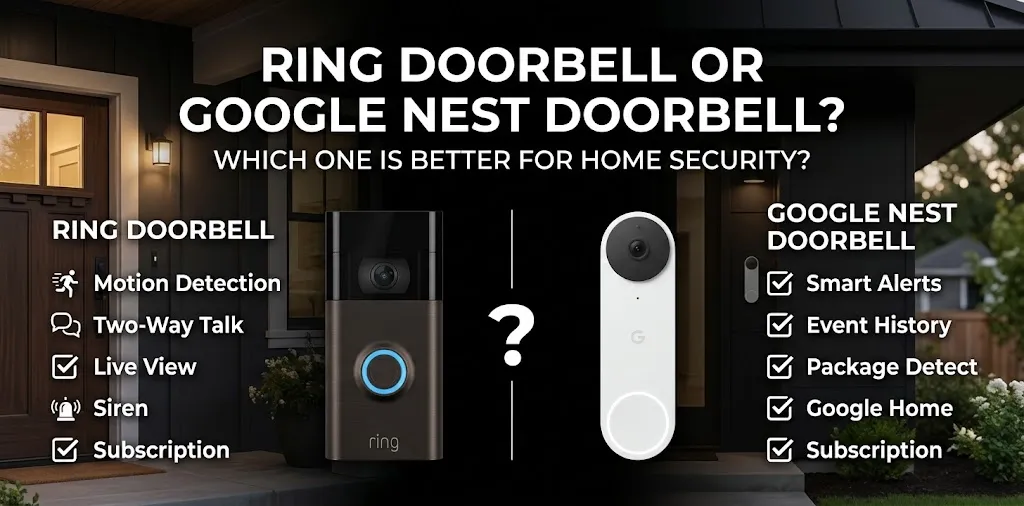
Ring Doorbell or Google Nest Doorbell? Which one is better for home security?

If you want a video doorbell mainly for home security, Ring and Google Nest take different approaches. Ring focuses heavily on the Alexa ecosystem, motion alerts, and flexible subscription features, while Nest emphasizes Google Home integration, HDR video, and built-in intelligent alerts. Your existing smart-home setup, wiring, and need for recorded video should guide the choice.
Ring Doorbell vs. Google Nest Doorbell: At a Glance
For a current comparison, it helps to look at the newer models rather than older Ring and Nest doorbells that are still mentioned in many online comparisons. Ring’s 2026 lineup includes the Battery Doorbell 2K Plus, while Google sells the Nest Doorbell (wired, 3rd gen).
| Feature | Ring Battery Doorbell 2K Plus | Google Nest Doorbell (wired, 3rd gen) |
|---|---|---|
| Video | Retinal 2K | 2K HDR |
| Field of view | 140° horizontal × 140° vertical | 166° diagonal |
| Power | Rechargeable battery; can be hardwired | Wired |
| Two-way talk | Yes | Yes |
| Person alerts | With Ring subscription | Built-in intelligent alerts |
| Package alerts | With Ring subscription | Built-in intelligent alerts |
| Vehicle alerts | With Ring subscription | Built-in intelligent alerts |
| Free event footage | Limited compared with paid plans | 6 hours of event previews |
| Paid video history | Up to 180 days with Ring plan | Up to 30 or 60 days, depending on Google plan |
| 24/7 recording | Available on eligible Ring devices with Premium | Available with Google Home Premium Advanced |
| Main ecosystem | Alexa | Google Home |
| Current listed price | $179.99 | $199.99 |
Prices and features can change, and subscription availability can depend on the specific model and plan.
Video Quality and Doorstep View
Both options provide high-resolution video, but they use different approaches.
The Ring Battery Doorbell 2K Plus uses 2K video and a 140° horizontal by 140° vertical head-to-toe view. Ring also lists up to 6x enhanced zoom and night vision.
The Nest Doorbell (wired, 3rd gen) also uses 2K video, but adds HDR and a 166° diagonal field of view. Google says its 1:1 aspect ratio is designed to help you see more of the area around the door.
For a porch where packages are left close to the door, the shape and placement of the camera can matter as much as resolution. A higher resolution number does not automatically mean you’ll get a more useful view of your doorstep.
Which Doorbell Is Better for Home Security?
Home security is about more than video resolution. You also need useful alerts, reliable access to recordings, a suitable field of view, and a setup that works with your home.
Ring for Alexa-Based Homes
Ring makes sense if your home already uses Amazon Alexa devices.
The Ring doorbell can fit naturally into an Alexa-based setup, and Ring offers features such as motion alerts, person and package alerts, video recording, and Doorbell Calls through its subscription plans.
For example, imagine you have Echo speakers around your home and several Ring cameras. Keeping your doorbell inside the same Ring and Alexa system can make managing alerts and cameras simpler.
Ring also gives you a battery-powered option, which can be useful if you do not want to depend on existing doorbell wiring. The Battery Doorbell 2K Plus uses a removable Quick Release Battery Pack and can also be hardwired.
Nest for Google Home Users
Nest is a natural fit if you already use Google Home, Google TV, Nest displays, or other compatible Google devices.
Google says the Nest Doorbell (wired, 3rd gen) can be viewed through compatible Google devices such as Nest displays, Pixel Tablet, and Google TV Streamer.
The Nest also includes built-in intelligent alerts for people, packages, animals, and vehicles. That means you can get useful detection features without relying entirely on a paid plan for basic alerts.
Subscription Costs Matter
This is one of the biggest differences between Ring and Nest.
Ring currently lists its subscription options at $4.99 per month for a single-device plan, $9.99 per month for coverage of multiple devices at one location, and $19.99 per month for its higher-tier plan. Ring plans can provide up to 180 days of event history, along with different levels of smart alerts and other features.
Google’s current Google Home Premium plans start at $10 per month or $100 per year for Standard. The Advanced plan is $20 per month or $200 per year and adds features such as up to 60 days of event history and up to 10 days of 24/7 video history for supported wired cameras and doorbells.
| Subscription consideration | Ring | Google Nest |
|---|---|---|
| Entry paid plan | $4.99/month | $10/month |
| Event history | Up to 180 days | Up to 30 or 60 days |
| Multiple devices | Available on higher plan | Google Home Premium covers supported devices |
| Advanced AI features | Higher Ring plans/add-ons | Advanced plan |
| 24/7 recording | Available on eligible devices/plans | Available on supported wired devices with Advanced |
The important point is that you should compare the subscription you actually need, not just the doorbell’s purchase price.
What You Get Without a Subscription
This can change the buying decision.
Ring says its products can be used without a subscription, but paid plans add video recording and other features. In other words, buying the doorbell does not automatically give you the full Ring recording experience.
Google includes more basic event functionality with the current Nest Doorbell. The wired 3rd-generation model includes up to six hours of event video previews, with clips up to 10 seconds, before upgrading to Google Home Premium.
If you do not want another monthly bill, this difference deserves attention before you buy.
Battery vs. Wired Installation
Your existing wiring may narrow down the choice.
The Ring Battery Doorbell 2K Plus has a removable rechargeable battery, so it can be installed where traditional doorbell wiring is not available. Ring also says it can be connected to an existing doorbell system.
The Nest Doorbell (wired, 3rd gen) requires a compatible 16–24VAC, 10–40VA doorbell transformer and chime, although Google also offers an indoor power-adapter option.
This creates a simple practical difference:
- No suitable wiring: a battery Ring model is easier to consider.
- Existing compatible wiring: either approach can work, but Nest’s wired model avoids routine battery charging.
- Want continuous recording: a wired setup is generally more suitable, because Google’s 24/7 video history requires a wired-supported device and Ring’s 24/7 recording is limited to eligible devices and plans.
Smart Detection and Alerts
A doorbell camera is only useful if its alerts help you understand what is happening.
The current Nest Doorbell (wired, 3rd gen) has built-in intelligent alerts for people, packages, animals, and vehicles. Google also offers more advanced notification features through Google Home Premium.
Ring offers person, package, and vehicle alerts through its subscription plans. Its higher-level plans can also add features such as video descriptions, video search, and familiar-face features on eligible devices.
That means the question is not simply “Which camera has AI?” Both companies now use intelligent detection. The more useful question is which alerts and recording features you will actually use and whether they require a subscription.
Privacy and Familiar-Face Features
Smart doorbells can collect sensitive information because they monitor an area where people regularly enter and leave.
Google says the Nest Doorbell uses encrypted video and two-step verification through your Google Account.
Both platforms also offer features that can identify or categorize people. Google says familiar-face detection requires Google Home Premium and warns that local laws may require consent. The feature is also unavailable for cameras based in Illinois.
If you plan to use any facial-recognition-style feature, check the rules that apply where you live and tell household members or visitors as appropriate.
Two Real-World Buying Examples
Example 1: An Alexa-Focused Home
Suppose your home already has several Echo devices and you want a battery-powered doorbell because your front door does not have convenient wiring.
A Ring battery doorbell can fit that setup naturally. You can also add a Ring subscription if you want saved recordings and additional alerts.
Example 2: A Google Home Setup
Suppose you already use a Nest Hub, Google TV, and other Google Home devices. You also want person, package, animal, and vehicle alerts and prefer a wired doorbell.
The Nest Doorbell (wired, 3rd gen) fits that type of setup because it works directly with Google Home and provides those intelligent alerts.
Which One Should You Choose?
The better fit depends on what matters most in your home.
| If your priority is… | Consider |
|---|---|
| Alexa integration | Ring |
| Google Home integration | Nest |
| Battery-powered installation | Ring |
| Wired 2K HDR doorbell | Nest |
| Lower-cost entry subscription | Ring |
| Basic intelligent alerts without relying on a paid plan | Nest |
| Long event-history storage | Ring |
| Google smart-home displays | Nest |
| A removable battery | Ring |
| 24/7 recording on a supported wired setup | Nest or eligible Ring model |
These are feature-based differences rather than a universal ranking. The right choice changes depending on your home’s wiring, smart-home ecosystem, and approach to subscriptions.
What About Home Security Beyond the Doorbell?
A video doorbell should not be treated as a complete home security system.
It can help you see visitors, monitor packages, receive motion alerts, and review recorded activity. But it does not replace properly secured doors and windows, outdoor lighting, smoke and carbon-monoxide protection, or a broader alarm system when those are appropriate for your home.
If you have several cameras, it is also worth choosing one ecosystem when possible. Managing multiple apps and separate subscriptions can become frustrating over time.
Frequently Asked Questions
Here are answers to some common questions about Ring and Google Nest doorbells, including subscription requirements, video quality, smart alerts, and which option may fit different home security setups.
Does Ring or Nest have better video quality?
The answer depends on the specific models being compared. The current Ring Battery Doorbell 2K Plus offers 2K video, while the Nest Doorbell (wired, 3rd gen) offers 2K HDR. Field of view, lighting, camera placement, and image processing can affect how useful the footage looks in real situations.
Can you use Ring without a subscription?
Yes. Ring says its devices can be used without a subscription, but recording and several additional security features require a paid plan. If you need to review footage after an event, check the exact recording features included with the model and plan you are considering.
Does Nest Doorbell require a subscription?
No, you can use the Nest Doorbell without Google Home Premium. The current wired 3rd-generation model includes basic event previews and intelligent alerts, while a Premium subscription adds longer video history and additional features.
The Bottom Line
Ring and Google Nest can both work well as part of a home-security setup, but they are built around different ecosystems and subscription models. Ring is particularly practical for Alexa users and homes that need a battery-powered option, while Nest is closely tied to Google Home and offers built-in intelligent alerts on its current wired model.
Before buying, check three things first: your doorbell wiring, the smart-home platform you already use, and how much recorded video you want to keep. Those factors can matter more than a small difference in camera specifications.