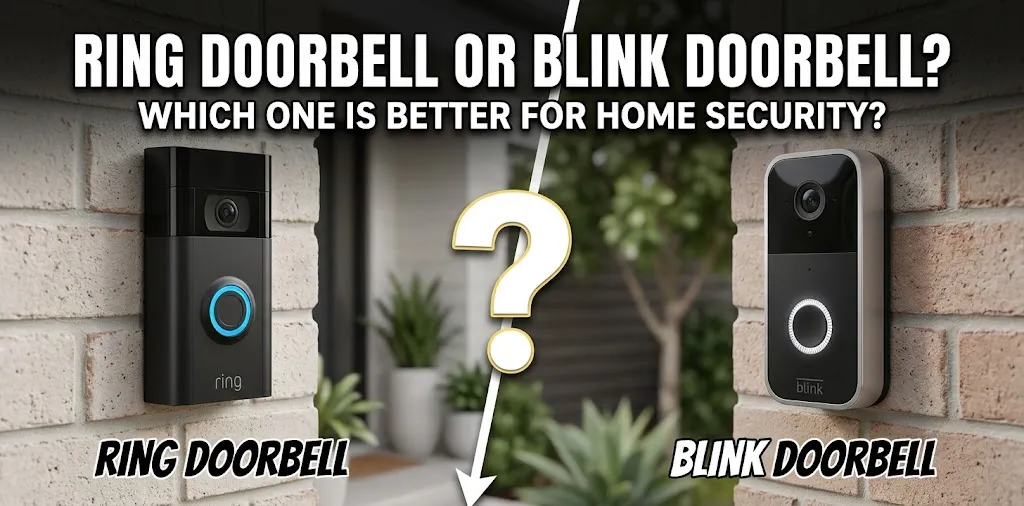
Ring Doorbell or Blink Doorbell? Which one is better for home security?

For home security, Ring Doorbell is generally the more feature-rich option, while Blink Doorbell is a simpler and more budget-focused choice. Ring offers a broader range of doorbells, advanced motion and security features, and deeper integration with Ring’s security ecosystem. Blink can make more sense if you want 2K video, easy installation, and the option to save recordings locally without a monthly subscription.
The right choice depends less on the brand name and more on how you plan to use the doorbell. A renter who mainly wants basic alerts has different needs from a homeowner who wants several cameras, recorded footage, package alerts, and a larger home security system.
Ring vs. Blink: What Is the Difference?
Ring and Blink are both Amazon-owned smart home security brands, but they serve somewhat different parts of the market. Ring has a larger selection of doorbells and security products, while Blink focuses more on straightforward, lower-cost smart cameras and doorbells.
Current models from both brands offer 2K options. For example, Ring’s 2026 Battery Doorbell 2K includes head-to-toe video, two-way talk, motion detection, and a rechargeable battery. Blink’s Battery Doorbell 2K+ offers 2K video, two-way audio, and battery or wired installation.
| Feature | Ring Doorbell | Blink Doorbell |
|---|---|---|
| Video options | 2K and 4K models available | 2K models available |
| Battery options | Several battery-powered models | Battery-powered models |
| Wired options | Yes | Yes |
| Two-way talk | Yes | Yes |
| Motion alerts | Yes | Yes |
| Local storage | Depends on model/system | Available with Sync Module 2 |
| Cloud recording | Ring Protect plan | Blink subscription |
| Smart-home focus | Ring + Alexa ecosystem | Blink + Alexa ecosystem |
| Product range | Broad | More focused |
| Typical positioning | More feature-focused | Simpler and budget-focused |
Video Quality and Viewing the Front Door
Video quality matters because a doorbell camera is only useful if you can clearly see what happened.
Ring’s current Battery Doorbell 2K uses a 140-degree horizontal and vertical head-to-toe view and supports up to 6x enhanced zoom. Higher-end Ring models go up to 4K.
Blink’s Battery Doorbell 2K+ also uses a 140° horizontal by 140° vertical field of view and records at up to 1920 × 1920 resolution. Blink says its 2K model can adjust video quality between Best, Standard, and Saver settings.
For everyday front-door monitoring, both can provide enough detail to see visitors and deliveries. The difference becomes more noticeable when you compare specific models rather than the two brands as a whole.
Motion Detection and Security Features
A doorbell should do more than simply record video when someone presses the button. Motion detection can notify you when someone approaches your property.
Ring’s newer doorbells include motion detection, while some models add features such as 3D Motion Detection and package alerts. Package Alerts require a compatible Ring Protect subscription.
Blink also provides motion-activated notifications. Its subscription adds features such as cloud recording and other advanced functions, depending on the device.
This creates an important difference in how the two systems work. If you want more advanced security functions and plan to build a larger Ring system, Ring gives you more room to expand.
Subscription Costs Matter
The purchase price is only part of the cost of a smart doorbell. Cloud recording and advanced features may require an ongoing subscription.
Ring currently offers several Ring Protect plans in the U.S. Ring Solo is $4.99 per month or $49.99 per year for one device, while Ring Multi is $9.99 per month or $99.99 per year for devices at one location. Higher plans add additional features and monitoring services.
Ring doorbells can still provide live video and real-time notifications without a subscription, but recorded video and several additional features require a compatible Ring Protect plan.
Blink takes a different approach because its doorbells can be used without a subscription. With a compatible Sync Module 2 and USB flash drive, supported Blink doorbells can save motion clips locally without a monthly cloud-storage fee.
With a Blink subscription, users can get cloud video recording with up to 60 days of storage for supported devices.
If avoiding recurring costs is important, Blink’s local-storage option is worth considering.
Installation and Power Options
Installation can make a big difference, especially for renters.
Ring has several battery-powered doorbells designed for relatively simple installation. Its current Battery Doorbell 2K uses a built-in rechargeable battery and can also be hardwired to a compatible existing doorbell system.
Blink’s Battery Doorbell 2K+ can operate using batteries or wired power. The current model uses three AA lithium batteries and requires a Sync Module.
Blink also sells a Wired Doorbell 2K+, which does not require a Sync Module, although it requires a separate compatible chime solution if you want an in-home audible alert.
For a rental home, check the mounting and power requirements before buying. A battery model may be easier if you cannot modify existing wiring.
Which One Works Better With a Larger Security System?
This is where the brand difference becomes more important.
Ring offers doorbells alongside cameras, alarms, sensors, and other security products. Its Ring Protect plans can cover multiple Ring devices at one location, depending on the plan.
Blink is also useful if you want several cameras around a home without building a more extensive alarm system. Its subscription plans can support multiple Blink devices, while compatible local-storage setups can reduce reliance on cloud storage.
For example, a homeowner might use a Ring Doorbell at the front entrance and add Ring cameras or an alarm system later. Someone who simply wants a doorbell plus a couple of affordable cameras may prefer Blink’s simpler setup.
Which Is Better for Privacy and Recorded Video?
Both systems involve connected cameras, so privacy settings and video storage should be considered before installation.
Ring provides customizable privacy settings on its current doorbells. Recorded video is stored in Ring’s cloud when you have a compatible subscription, with Ring currently offering up to 180 days of video history on its plans.
Blink gives you another option through local storage. A compatible Sync Module 2 with a USB flash drive can store supported doorbell clips without requiring a cloud subscription.
If keeping recordings locally is a major priority, check the exact Blink model and storage requirements before purchasing.
Ring Doorbell vs. Blink Doorbell for Different Homes
For a homeowner who wants more security features
Ring makes sense if you want to build beyond a basic doorbell. Its product lineup includes multiple doorbell types, cameras, alarm products, and subscription features.
For a renter or budget-conscious buyer
Blink can be appealing when simple installation and lower ongoing costs matter. Its Battery Doorbell 2K+ is designed for wire-free installation, and local recording is available with the required Sync Module 2 setup.
For someone who wants recorded video without a monthly fee
Blink deserves a close look because supported doorbells can use local storage through a Sync Module 2 and USB flash drive.
For someone who wants a broader security ecosystem
Ring offers a larger range of security products and subscription features, making it easier to expand into a more complete Ring-based system later.
What Should You Check Before Buying?
Don’t compare only the advertised resolution. Check these factors for the exact models you are considering:
- Power: rechargeable battery, replaceable batteries, or hardwired
- Video: resolution, field of view, and night vision
- Storage: cloud-only, local storage, or both
- Subscription: what features remain available without paying monthly
- Chime: whether your existing indoor chime works
- Wi-Fi: whether your home’s signal reaches the front door reliably
- Smart-home compatibility: especially if you already use Alexa or another smart-home platform
- Installation: whether you can drill or modify existing wiring
- Ongoing cost: include subscriptions and optional accessories
A cheap doorbell can become less attractive if you later need to buy a chime, storage hardware, subscription, or other accessories.
Ring Doorbell or Blink Doorbell: Which Should You Buy?
For a buyer focused on more advanced home-security features and a broader security ecosystem, Ring is the more feature-focused route. Its current lineup includes multiple 2K and 4K doorbells, advanced detection options on select models, and subscription plans that extend recording and security features.
For someone focused on simple monitoring, 2K video, and avoiding a required cloud subscription, Blink is worth considering. Its supported doorbells can work without a subscription, and the Sync Module 2 provides a local-storage option.
The key is to compare the exact doorbell models and the total cost over time rather than assuming every Ring or Blink product has the same features.
Frequently Asked Questions
If you’re still deciding between Ring and Blink, these common questions can help you understand the key differences before choosing a doorbell for your home.
Is Ring or Blink better for home security?
Ring offers a broader range of security products and more advanced subscription features, while Blink focuses more on straightforward, budget-friendly smart security. The better fit depends on whether you prioritize an expandable security system or simpler monitoring with local-storage options.
Can I use a Blink Doorbell without a subscription?
Yes. Blink doorbells can work without a Blink subscription, and supported models can save recordings locally through a Sync Module 2 and compatible USB flash drive. Cloud recording and additional features are available through Blink’s subscription plans.
Does Ring Doorbell work without a subscription?
Yes. Ring doorbells can provide live video and real-time alerts without a Ring Protect plan, but recorded video and several advanced features require a compatible subscription.
Final Takeaway
Ring and Blink can both work well for front-door monitoring, but they approach home security differently. Ring gives you a broader path toward a connected security system, while Blink provides a simpler approach with useful local-storage options.
Before buying, choose the exact model first, then check its power requirements, recording options, subscription features, and chime compatibility. That comparison will tell you more than the Ring-versus-Blink brand names alone.