Apple Pencil Pro or Apple Pencil USB-C? Which one is better for students?

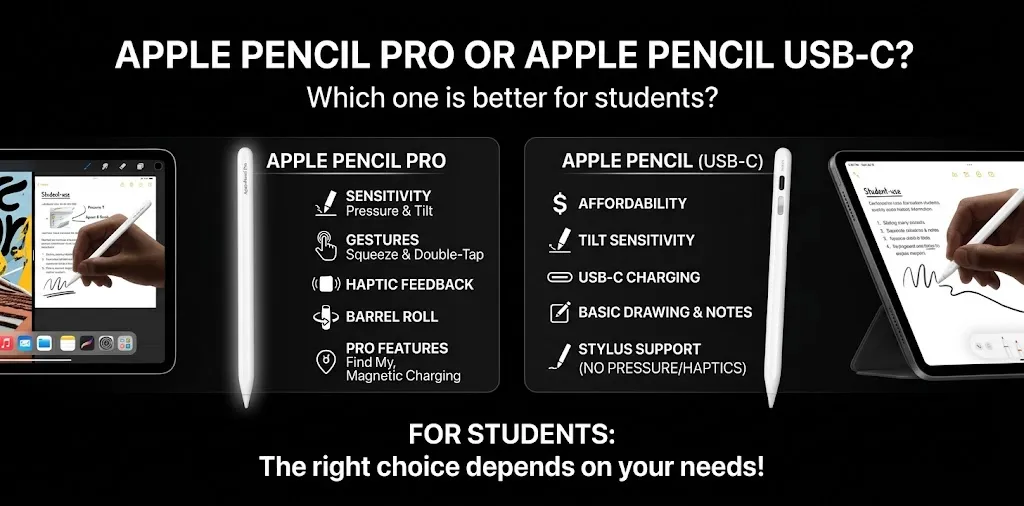
If you are buying an Apple Pencil mainly for school or college, the Apple Pencil USB-C is the better choice for most students. It handles handwritten notes, PDF annotation, homework, diagrams, and everyday studying at a lower price. The Apple Pencil Pro is worth paying more for if you also draw regularly, need pressure sensitivity, or want features such as squeeze, barrel roll, haptic feedback, and wireless charging. Apple’s current U.S. education store lists the Pro at $119 and the USB-C model at $69.
The choice becomes easier once you look at how you actually use an iPad. A student who mostly writes notes does not necessarily benefit from every Pro feature, while a design or art student may notice the difference every day.
Apple Pencil Pro vs. Apple Pencil USB-C: Quick comparison
| Feature | Apple Pencil Pro | Apple Pencil USB-C |
|---|---|---|
| Current Apple U.S. education price | $119 | $69 |
| Regular Apple price | Higher than USB-C | Lower than Pro |
| Handwritten notes | Excellent | Excellent |
| PDF annotation | Excellent | Excellent |
| Pixel-perfect precision | Yes | Yes |
| Low latency | Yes | Yes |
| Tilt sensitivity | Yes | Yes |
| Pressure sensitivity | Yes | No |
| Squeeze gesture | Yes | No |
| Barrel roll | Yes | No |
| Haptic feedback | Yes | No |
| Double-tap | Yes | No |
| Find My | Yes | No |
| Magnetic attachment | Yes | Yes |
| Magnetic wireless charging | Yes | No |
| USB-C charging | No | Yes |
| Apple Pencil hover | Yes, on supported iPads | Yes, on supported iPads |
| Best for | Creative students and power users | Most students and note-takers |
Apple lists pixel-perfect precision, low latency, and tilt sensitivity on the USB-C model, while the Pro adds pressure sensitivity and several advanced controls.
The biggest point is simple: both can do the basic schoolwork most students expect from an Apple Pencil.
The Apple Pencil USB-C is enough for most student work
The Apple Pencil USB-C was designed around common tasks such as taking notes, sketching, marking up documents, and journaling. It offers pixel-perfect precision, low latency, and tilt sensitivity.
That covers a large part of what students actually do with an iPad.
For example, a student might use an iPad to:
- Take handwritten lecture notes
- Write homework answers
- Annotate PDF textbooks
- Highlight important passages
- Solve math problems
- Draw diagrams
- Make study flashcards
- Mark up class slides
- Keep a digital planner
- Write personal notes
None of these tasks requires pressure sensitivity.
That is why the USB-C model can be a particularly good choice for students who want an iPad to replace some of their paper notebooks.
Handwritten notes
For handwriting, the important qualities are accurate tracking, low latency, and a comfortable writing experience.
The USB-C model has all three of the core features Apple highlights for everyday writing: precision, low latency, and tilt sensitivity.
So if your main question is, “Will Apple Pencil USB-C be good for taking college notes?”, the answer is yes.
The Pro does not suddenly make normal handwriting twice as good. Its advantage comes from the extra features around the writing experience.
PDF annotation
Students who read digital textbooks or receive assignments as PDFs can also use the USB-C Pencil to write directly on documents.
You can underline text, circle important sections, add handwritten comments, draw arrows, and work through problems.
For this type of student, paying more for the Pro may not provide much additional value.
Math and science notes
The USB-C Pencil can also be useful for subjects where handwriting is easier than typing.
A math student might write equations directly on an iPad. A biology student could sketch a cell diagram. An engineering student could make quick diagrams during class.
These activities benefit from precise input, but they do not normally require pressure sensitivity.
Where Apple Pencil Pro is different
The Apple Pencil Pro is not simply a more expensive version of the USB-C Pencil.
It adds several features that can change how you interact with the iPad.
Apple lists pressure sensitivity, squeeze, barrel roll, haptic feedback, double-tap, Find My, and magnetic pairing and charging among the Pro’s capabilities.
These features matter more for some students than others.
Pressure sensitivity matters for artists
This is probably the biggest feature separating the two models for creative students.
Apple Pencil Pro supports pressure sensitivity. Apple Pencil USB-C does not.
With pressure sensitivity, compatible apps can respond differently depending on how hard you press the Pencil.
That can be useful when:
- Drawing
- Painting
- Shading
- Creating digital illustrations
- Using pressure-sensitive brushes
- Working on detailed artwork
If you are studying graphic design or illustration and spend a lot of time drawing on your iPad, this difference can be important.
If you are studying history and mostly writing notes, it probably is not.
Apple Pencil Pro’s squeeze gesture can make tool switching faster
The Pro can detect a squeeze. Apple says this can bring up a palette so you can quickly switch tools, line weights, and colors.
This can be useful when you are working quickly.
Imagine you are drawing a diagram and repeatedly switching between a pen, eraser, and other tools. Instead of reaching for the screen each time, the Pencil itself can provide a shortcut.
For a note-taking student, however, this is more of a convenience than a necessity.
Barrel roll is mainly useful for creative work
Apple Pencil Pro also includes a gyroscope that enables barrel roll.
The Pencil can detect how you rotate it, allowing compatible shaped pen and brush tools to respond to that rotation.
This is more useful for artists than students who use the Pencil mainly as a digital pen.
If you are drawing with a brush that changes shape based on orientation, barrel roll can give you more control.
For normal handwriting, you probably will not notice much difference.
Haptic feedback gives the Pro a more interactive feel
Apple Pencil Pro includes a custom haptic engine.
When you squeeze or double-tap the Pencil, you can feel a small response confirming the action.
It is a nice feature, but it should not be the main reason a student spends more money.
Think of it as an improvement to the overall experience rather than a feature that changes what you can accomplish in class.
Wireless charging is one of the Pro’s most useful everyday advantages
The charging difference is easy to overlook.
Apple Pencil Pro magnetically attaches to compatible iPads and can pair and charge wirelessly while attached. The USB-C Pencil magnetically attaches to the iPad for storage, but it charges through a USB-C cable.
For occasional users, this may not matter much.
For a student who uses an Apple Pencil every day, it can be convenient to simply attach the Pencil to the iPad when finished.
With the USB-C model, you need to connect a cable when the battery needs charging.
That does not make the USB-C model inconvenient overall, but it is one of the practical advantages of the Pro.
Find My is another Pro-only advantage
Losing an Apple Pencil is frustrating, especially when you need it before class.
Apple Pencil Pro supports Find My, while the USB-C model does not list Find My among its features.
This can be useful for students who frequently move between:
- Home
- School
- College
- Libraries
- Coffee shops
- Study groups
It will not prevent you from losing the Pencil, but it can make locating a misplaced Pro easier.
Which Apple Pencil is better for college students?
For the average college student, Apple Pencil USB-C is the better value.
College students often use an iPad for a mix of notes, reading, assignments, PDFs, and studying. Those tasks do not require most of the Pro’s advanced features.
The lower price also leaves more of your budget for other school needs.
For example, if you are buying an iPad, keyboard, case, screen protector, and Pencil at the same time, saving $50 on the Pencil can be meaningful.
The Pro becomes more attractive when the iPad is not just a notebook but also a major creative tool.
Choose USB-C for a typical college workload
The USB-C model makes sense if you mainly:
- Take lecture notes
- Annotate textbooks
- Complete digital worksheets
- Read PDFs
- Solve math problems
- Make diagrams
- Use Apple Notes or similar note-taking apps
- Occasionally sketch
- Want to spend less
For this type of workload, the cheaper Pencil is unlikely to feel like a major compromise.
Choose Pro for a creative college major
The Pro makes more sense if your coursework involves frequent drawing or creative production.
For example:
Graphic design student: pressure sensitivity and creative controls can be useful throughout the week.
Architecture student: detailed sketches and drawings may make the Pro’s extra capabilities more valuable.
Illustration student: pressure sensitivity, barrel roll, and advanced brush controls can matter much more.
Computer science student: if the Pencil is mostly used for notes and diagrams, the USB-C model is likely enough.
The right choice depends more on the student’s workflow than on the student’s age or education level.
Which one is better for high school students?
For most high school students, I would also choose the Apple Pencil USB-C.
High school students may use an iPad for:
- Class notes
- Homework
- Reading
- PDF worksheets
- Presentations
- Simple diagrams
- Study materials
- Occasional drawing
The USB-C model handles these tasks well.
The Pro makes more sense if the student already knows they need pressure-sensitive drawing or other advanced features.
Buying the Pro simply because it is the “Pro” model can mean spending extra money on features that may rarely be used.
Which one is better for note-taking?
Apple Pencil USB-C wins on value, while both are strong for actual note-taking.
This is an important distinction.
If you compare only the ability to write notes, there is no reason to assume that the Pro will automatically produce better handwriting.
The USB-C Pencil has pixel-perfect precision, low latency, and tilt sensitivity.
The Pro adds features around that core experience.
So if your main goal is:
“I want an Apple Pencil for handwritten notes.”
The USB-C model is the one I would recommend first.
If your goal is:
“I want an Apple Pencil for notes, drawing, design, and creative work.”
Then the Pro becomes much more compelling.
Which one is better for drawing?
Apple Pencil Pro is the better choice for serious drawing.
The main reason is pressure sensitivity.
A USB-C Pencil can still be used for sketching, but it lacks pressure sensitivity. Apple specifically lists pressure sensitivity for the Pro and not for the USB-C model.
If drawing is only an occasional hobby, you may not need the Pro.
If drawing is part of your schoolwork, major, or career path, the additional features are easier to justify.
What about Goodnotes and other note-taking apps?
For students using apps such as Goodnotes or other handwriting-focused apps, the USB-C Pencil can be a practical choice.
The basic workflow is simple:
- Open your notebook.
- Select your pen.
- Write normally.
- Switch tools when needed.
- Mark up your notes or PDFs.
You do not need pressure sensitivity just to write normal digital notes.
The Pro can make tool switching more convenient through features such as double-tap and squeeze, but those are workflow improvements rather than requirements.
So if you are buying an iPad specifically for digital note-taking, do not assume you need the Pro.
Which one is better for reading and highlighting?
For students who mainly read textbooks and highlight material, Apple Pencil USB-C is usually the better buy.
You can use it to annotate documents and write notes while studying. Apple specifically describes the USB-C Pencil as suitable for marking up documents.
The Pro does not provide a major advantage simply because you are highlighting text.
If most of your study time involves reading rather than drawing, the cheaper model is easier to recommend.
Compatibility is more important than the price
Before buying either Pencil, check your exact iPad model.
This is one of the easiest mistakes to make.
Apple Pencil Pro works only with newer compatible iPads, including the iPad Pro with M4 or M5, iPad Air with M2, M3, or M4, and iPad mini with A17 Pro.
Apple Pencil USB-C supports a wider range of iPads, including newer models and several older iPad Pro and iPad Air generations.
Apple Pencil Pro compatibility
Apple currently lists these compatible iPads for Apple Pencil Pro:
- iPad Pro 11-inch with M4 or M5
- iPad Pro 13-inch with M4 or M5
- iPad Air 11-inch with M2, M3, or M4
- iPad Air 13-inch with M2, M3, or M4
- iPad mini with A17 Pro
Apple says Apple Pencil Pro requires iPadOS 17.5 or later on compatible models.
Apple Pencil USB-C compatibility
The USB-C Pencil supports a broader selection, including:
- iPad Pro 11-inch, 1st through 4th generation
- iPad Pro 11-inch with M4 or M5
- iPad Pro 12.9-inch, 3rd through 6th generation
- iPad Pro 13-inch with M4 or M5
- iPad Air 4th and 5th generation
- iPad Air 11-inch with M2, M3, or M4
- iPad Air 13-inch with M2, M3, or M4
- iPad 10th generation
- iPad A16
- iPad mini 6
- iPad mini A17 Pro
Apple lists iPadOS 17.1.1 or later as the system requirement for the USB-C Pencil.
This broader compatibility is one reason the USB-C model can be a better choice for students using an older compatible iPad.
Apple Pencil Pro vs. USB-C price: Is the extra money worth it?
Apple’s current U.S. education pricing lists the Apple Pencil Pro at $119 and the Apple Pencil USB-C at $69. That is a $50 difference before tax.
For students, that price difference matters.
The question is not simply:
“Is the Pro better?”
It is.
The better question is:
“Are the Pro features worth $50 more for the way I study?”
For many students, the answer is no.
When $50 more makes sense
The additional cost is easier to justify if you:
- Draw frequently
- Need pressure sensitivity
- Use professional creative apps
- Want wireless charging
- Frequently switch tools
- Want Find My
- Plan to keep the Pencil for several years
- Use the Pencil for both school and creative work
When saving $50 makes more sense
Save the money if you:
- Mainly take notes
- Annotate PDFs
- Read textbooks
- Complete homework
- Make simple diagrams
- Rarely draw
- Do not need pressure sensitivity
- Want the lowest-cost Apple Pencil for a compatible iPad
For a student on a limited budget, the USB-C model is particularly easy to recommend.
Apple Pencil Pro vs. USB-C for different types of students
| Student type | Better choice | Why |
|---|---|---|
| High school note-taker | USB-C | Core writing features are enough |
| College note-taker | USB-C | Good value for notes and PDFs |
| Medical student | USB-C | Useful for notes, diagrams, and PDFs |
| Law student | USB-C | Strong fit for reading and annotation |
| Math student | USB-C | Good for equations and handwritten work |
| Computer science student | USB-C | Notes and diagrams are the main use |
| Graphic design student | Pro | Pressure sensitivity and creative controls |
| Illustration student | Pro | Better suited to detailed drawing |
| Architecture student | Pro | More useful for creative drawing workflows |
| Art student | Pro | Pressure sensitivity and advanced controls |
| Casual sketcher | USB-C | Lower price makes more sense |
| Heavy iPad creative user | Pro | Extra features can improve workflow |
This table is not about which Pencil is technically more capable. The Pro is more capable. It is about which model makes sense for each student’s actual workload.
What you give up by choosing Apple Pencil USB-C
The USB-C model is cheaper, but there are some real compromises.
You do not get:
- Pressure sensitivity
- Squeeze
- Barrel roll
- Haptic feedback
- Double-tap
- Find My
- Magnetic wireless charging
Apple’s feature comparison identifies these as differences between the Pro and USB-C models.
These are not imaginary differences.
The key is deciding whether they matter to you.
If you never draw, pressure sensitivity may not matter.
If you rarely switch tools, squeeze and double-tap may not matter.
If you always charge your devices with a USB-C cable, wireless charging may not matter.
If you tend to lose small accessories, Find My could matter more.
What you give up by choosing Apple Pencil Pro
The biggest downside of the Pro is not its performance. It is paying more for features you may not use.
A student who only needs a digital pen could spend $119 and still use the Pencil in a very simple way.
That does not make the Pro a bad purchase. It simply means the extra money may not provide much practical benefit for that particular student.
For a student budget, value matters.
Is Apple Pencil USB-C good enough for four years of college?
For a student who mainly takes notes, annotates PDFs, and studies from an iPad, yes, it can be a sensible long-term choice.
Its core features are not limited to basic temporary use. Apple describes the USB-C model as a full Apple Pencil designed for note-taking, sketching, document markup, and journaling.
If your academic needs later change and you move into heavy illustration or design work, you may eventually want a Pro.
But there is little reason to pay for those advanced capabilities now if you already know you will mostly write.
Two realistic student examples
Example 1: The everyday note-taker
Imagine a college student studying business.
They use their iPad during lectures and spend most of their time:
- Writing notes
- Highlighting PDFs
- Reading articles
- Creating study guides
- Making simple charts
They rarely draw.
For this student, Apple Pencil USB-C is the logical choice.
The Pro would work, but most of its special features would probably sit unused.
Example 2: The design student
Now imagine a student studying graphic design.
They use the iPad for class notes but also spend several hours a week drawing illustrations and working with digital brushes.
For this student, Apple Pencil Pro makes much more sense.
Pressure sensitivity alone can be a meaningful reason to choose the Pro, and the additional controls can improve the creative workflow.
Apple Pencil Pro or USB-C: Which should you buy?
The easiest way to decide is to ignore the names for a moment and look at your daily tasks.
Buy Apple Pencil USB-C if you mainly need a digital notebook
Choose it if your iPad is primarily for:
- Class notes
- Homework
- PDF annotation
- Reading
- Study guides
- Math
- Diagrams
- Occasional sketches
It gives you the core Apple Pencil experience without the higher price.
Buy Apple Pencil Pro if your iPad is also a creative workstation
Choose it if you:
- Draw regularly
- Need pressure sensitivity
- Use advanced brush tools
- Want faster tool switching
- Want magnetic wireless charging
- Want Find My
- Plan to use the iPad for serious creative work
The Pro is a better fit when those features will actually be part of your daily workflow.
FAQ
Is Apple Pencil Pro worth it for college students?
For most college students who mainly take notes and annotate PDFs, the Apple Pencil USB-C offers better value. The Pro is worth the extra cost when the student regularly draws, needs pressure sensitivity, or wants features such as wireless charging, squeeze, and Find My.
Does Apple Pencil USB-C have pressure sensitivity?
No. Apple Pencil USB-C has pixel-perfect precision, low latency, and tilt sensitivity, but it does not include pressure sensitivity. If pressure-sensitive drawing is important for your coursework, Apple Pencil Pro is the better option.
Can Apple Pencil Pro and Apple Pencil USB-C work with the same iPad?
Sometimes, yes. Several newer iPads support both models, but the exact compatibility depends on the iPad generation and chip. Apple Pencil Pro has a more limited compatibility list, so check your exact iPad model before purchasing.
The bottom line
For most students, Apple Pencil USB-C is the better buy.
It provides the features that matter most for schoolwork: precise writing, low latency, tilt sensitivity, note-taking, sketching, and document markup. Apple’s current U.S. education price is also $50 lower than the Pro.
Apple Pencil Pro is the better choice for students who also use their iPad for serious creative work. Its pressure sensitivity, squeeze gesture, barrel roll, haptic feedback, double-tap, Find My, and magnetic charging make the extra cost easier to justify for artists, designers, and other creative users.
Before buying, check your exact iPad model first. Then ask yourself one simple question: Will I actually use the Pro features regularly? If the answer is no, save the $50 and choose the Apple Pencil USB-C.